Chart Settings · Beginner
How to Change the TradingView Timezone: Chart, Exchange, and Local Time
When you look at someone else's TradingView screenshot and the same candle shows a different time than yours—often the data isn't wrong, the timezone setting is different. A timezone doesn't change price, only how time is displayed on the axis, yet it frequently makes the open/close, economic calendar, extended hours, and alert times fail to match.
Bottom Line First: A Timezone Changes the Time Display, Not the Price Itself
The timezone setting mainly affects the time-axis display. It does not change a candle's open/high/low/close, nor the real trades. The same US-stock candle might read 9:30 in New York time and late evening in Singapore time—it is still the same candle, only the time label is shown differently.
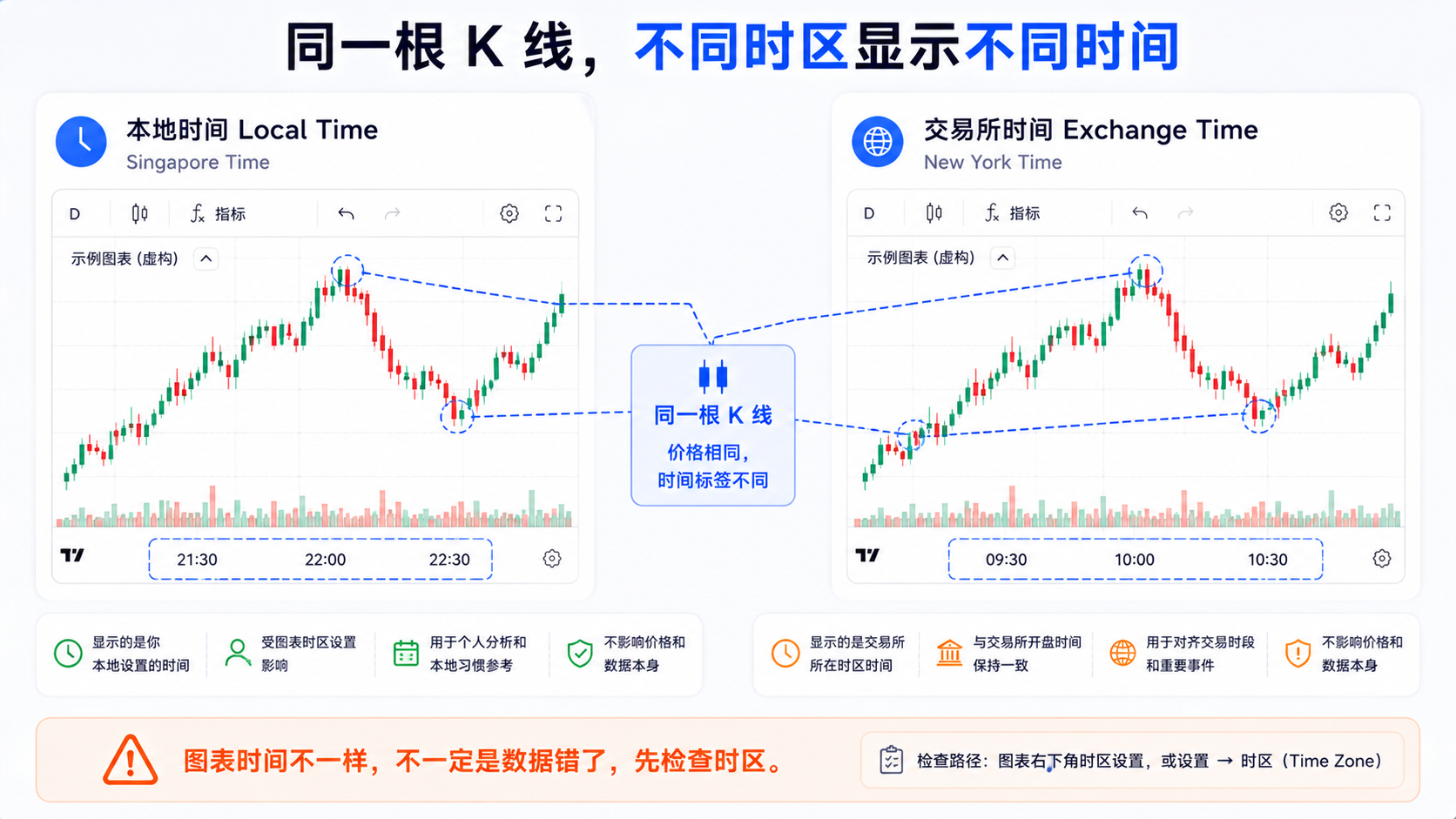
When screenshot times differ, the open looks wrong, economic data is off by an hour, extended hours don't line up, or the alert and chart times disagree—check the timezone first. Official docs say you can change the chart timezone via the bottom clock or the chart settings Symbol tab.
Where Do You Set the TradingView Chart Timezone?
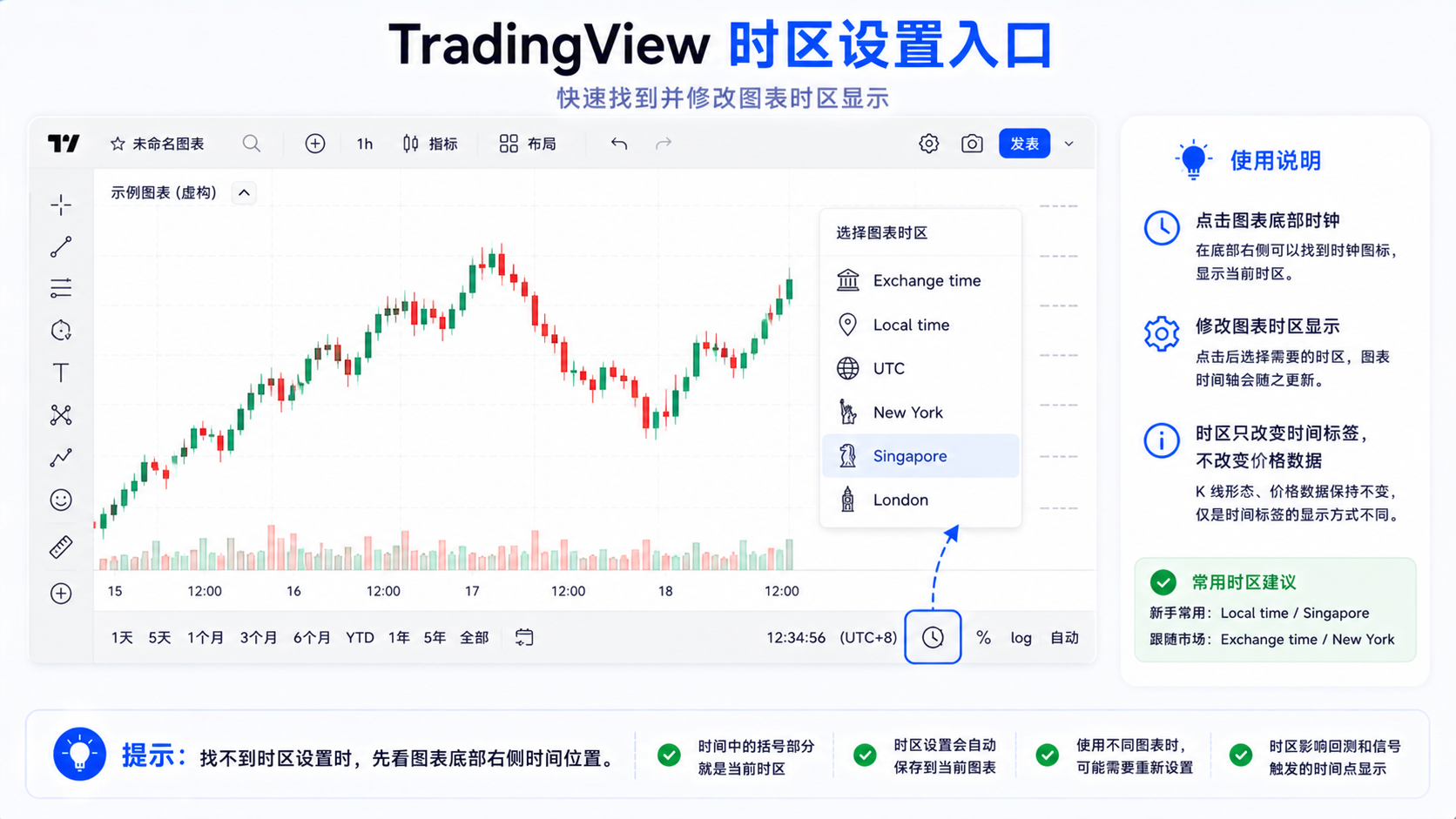
Method 1: Click the Clock at the Bottom of the Chart
There is usually a clock or timezone display at the bottom-right of the chart. Clicking it opens the timezone menu—if you want to quickly switch to exchange time, local time, or a city timezone, start here.
Method 2: Change It in Chart Settings
Open chart settings and change it in the Symbol tab or the related Timezone option. The interface may vary slightly by version, but the principle stays the same: find the bottom clock, or find the Symbol / Timezone setting.
What's the Difference Between Exchange Time, Local Time, and a Custom Timezone?
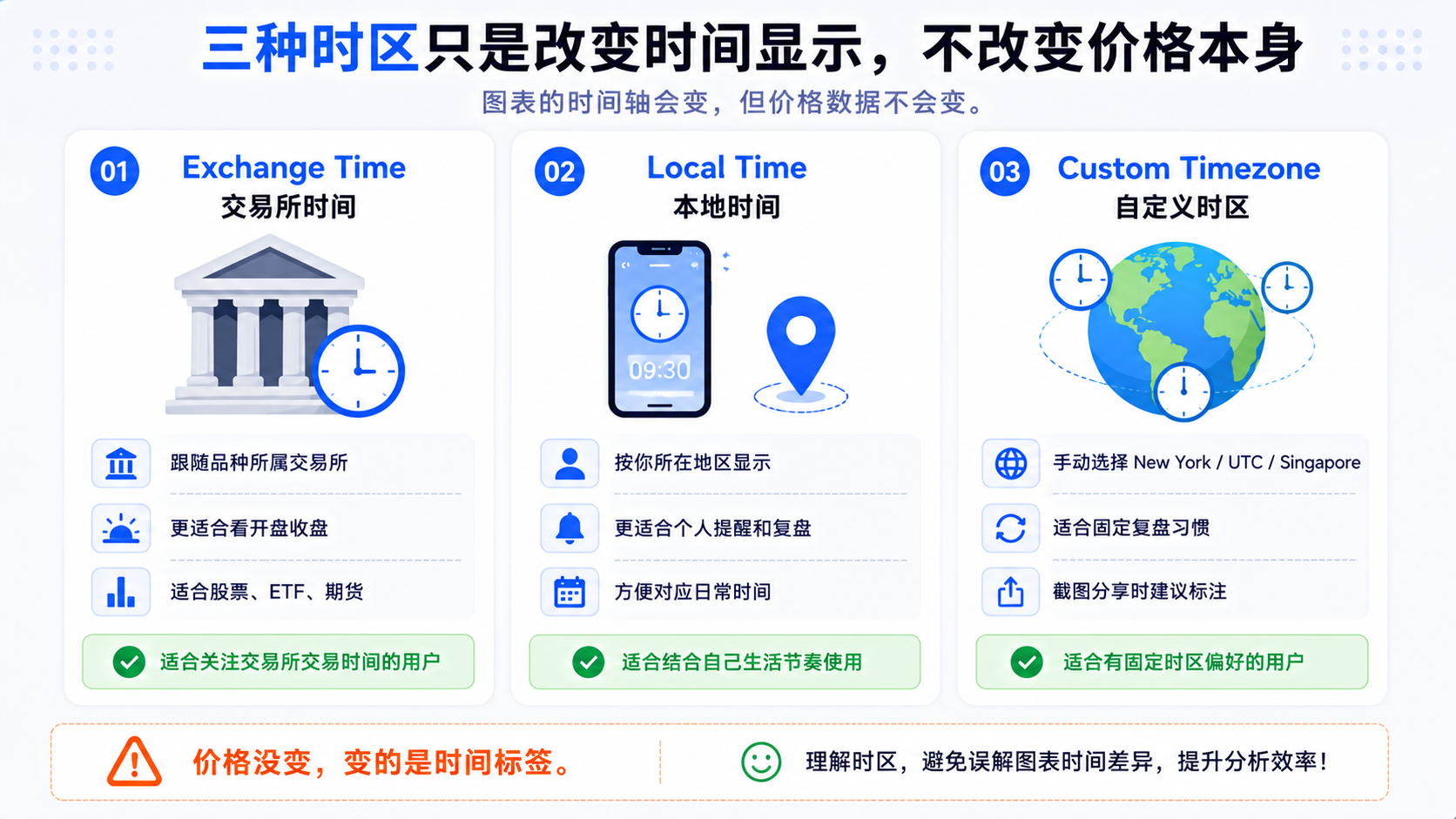
1. Exchange Time
Displayed by the timezone of the symbol's exchange or data source. For US stocks it is usually close to New York market time; when you switch markets, Exchange time may change too. The charting library docs also note: besides the chart timezone, each symbol has its own timezone, and setting it correctly affects data alignment.
The upside is you don't have to convert open/close yourself—good for stocks, ETFs, futures, and other instruments with clear trading sessions.
2. Local Time
Displayed by your region or device timezone, which is more intuitive for economic data, alerts, and daily routine. The downside is that when discussing "the 9:30 open" with others, your chart may show evening, causing confusion.
3. Custom Timezone
Manually specify New York, London, UTC, Singapore, Tokyo, Hong Kong, and so on. If you often watch one market, pin that timezone; beginners shouldn't switch too often.
When Should You Use Exchange Time?
When you mainly watch stocks, ETFs, and futures, use Exchange time first. Regular open/close, extended hours, and high-volume windows are all easier to align with the exchange's rhythm.
If you ask "why doesn't the open line up" or "why is it not 9:30 for me when it is for others"—switch to Exchange time first. Understand it together with timeframes: the timeframe determines candle granularity, the timezone determines the time label.
When Can You Use Local Time?
When you care more about alerts and scheduling, local time is more convenient: what local time economic data lands, when an alert rings, what local time an after-hours earnings maps to. It suits watching across markets, reviewing on your own schedule, and not wanting to convert time differences repeatedly.
When sending a screenshot to others, note the timezone, e.g. "chart time is Singapore time", to avoid the other side thinking it's not the same session.
Which Users Are Custom Timezones For?
- US-stock users — New York, matching the regular session and extended hours;
- Forex users — London, New York, Tokyo, etc. (the timezone only affects display, it doesn't mean the market is active only in that zone);
- Crypto — often UTC, convenient for cross-region communication in a 24-hour market;
- Writing tutorials / screenshots — pin one timezone to avoid inconsistency.
How Does Timezone Relate to the Economic Calendar?
The release times of CPI, non-farm payrolls, and rate decisions are critical; being off by an hour can throw off your whole review. A common mistake: the chart uses exchange time, notes use local time, and the news screenshot is yet another timezone.
When reviewing major events, unify the timezone first—all exchange time, all local time, or clearly labeled UTC. Don't mix them.
How Does Timezone Relate to Extended Hours?
The US regular session is daytime in New York but may be nighttime in Asia; when using local time, the Extended Hours area also maps to your local time—this doesn't mean the data is wrong.
To study extended hours, use Exchange time or New York time to align with common market phrasing.
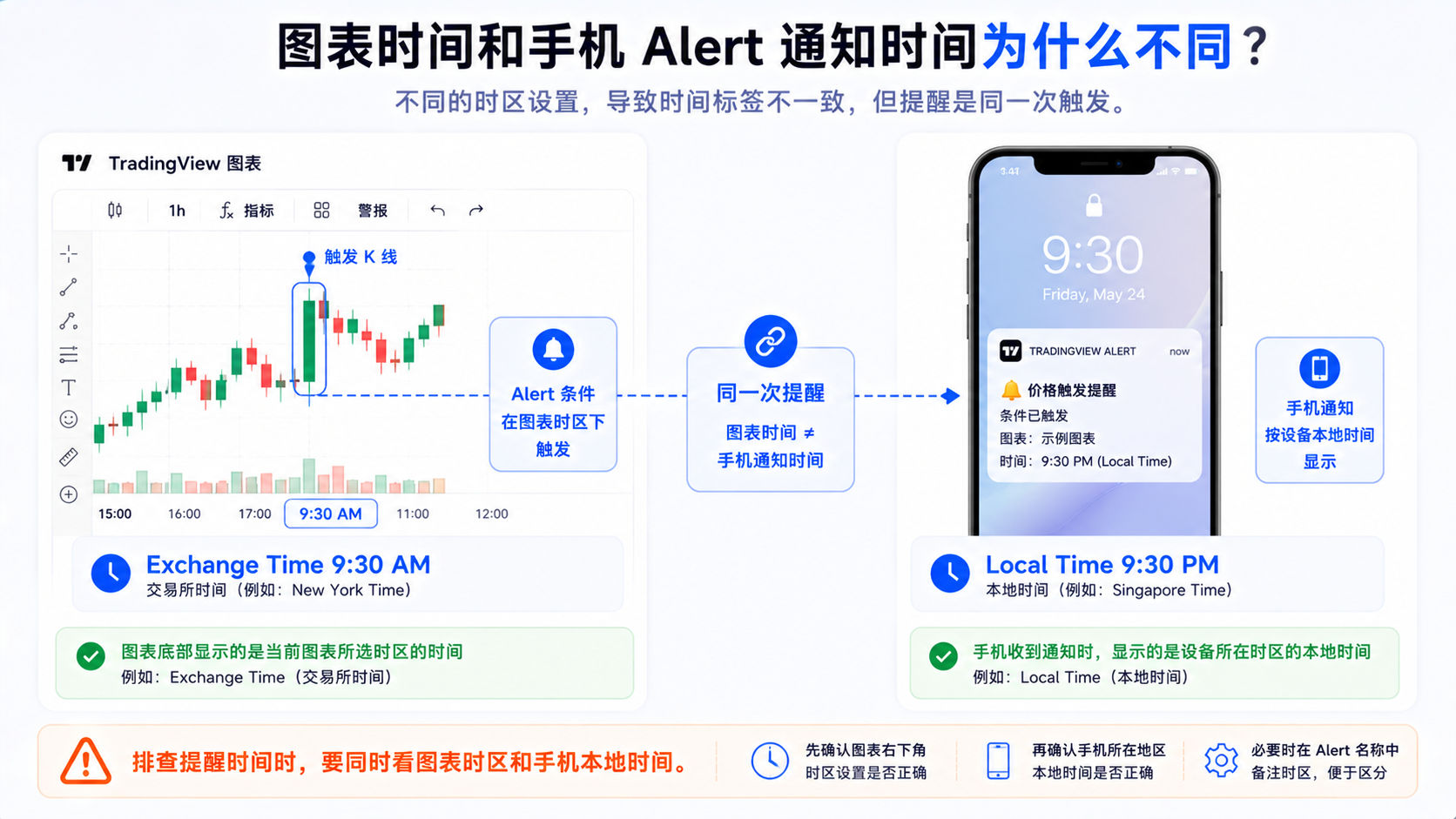
How Does Timezone Relate to Alert Time?
Distinguish two layers of time:
- When the condition triggers, the time the chart candle shows by the chart timezone;
- When you get the notification, the phone/email usually shows the device local time.
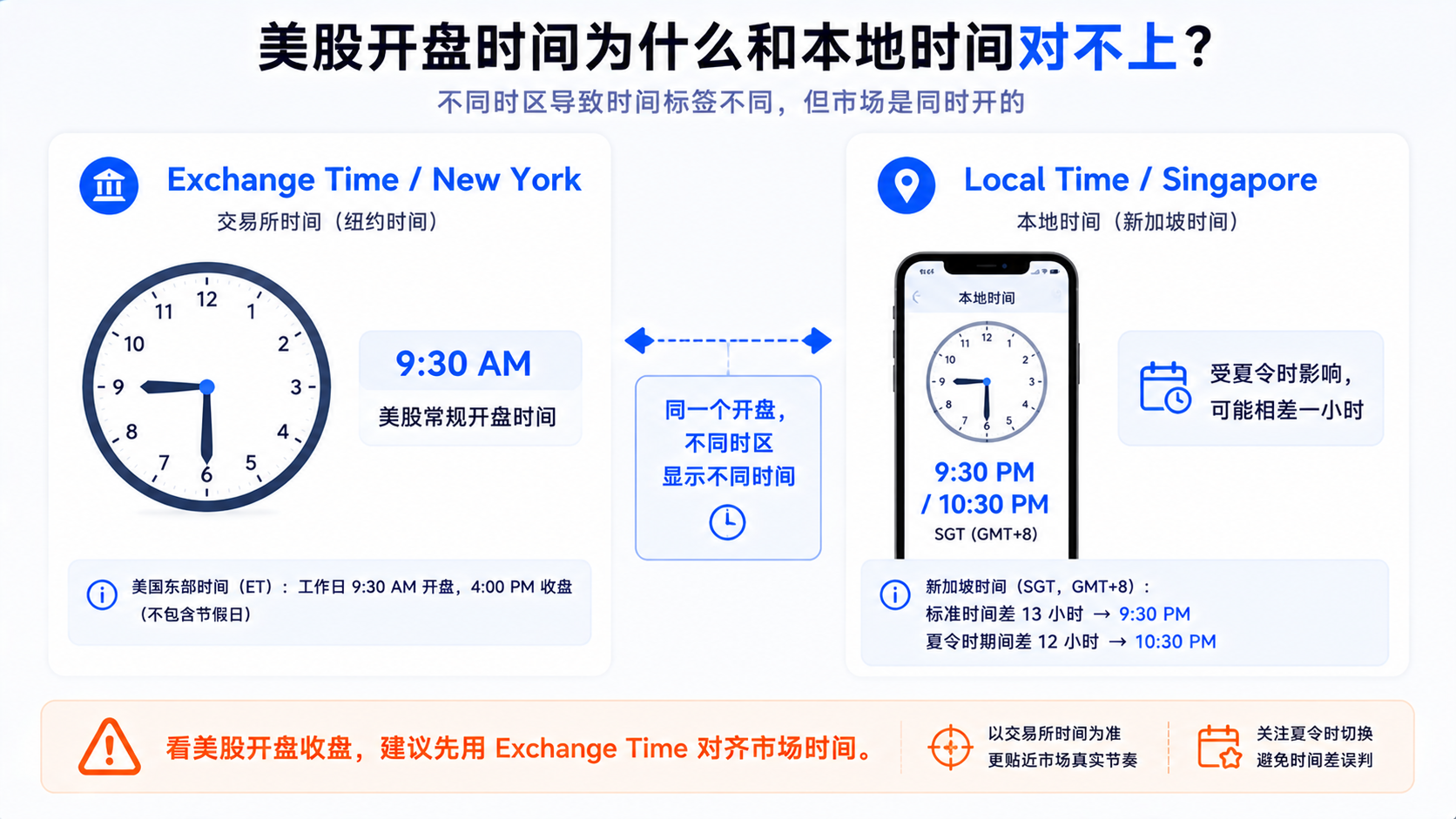
For example, if the chart uses New York time and triggers at 9:30, a Singapore phone might receive the notification at 21:30 or 22:30—that's not a contradiction. When troubleshooting alerts, combine mobile alert troubleshooting and the alerts manager, and confirm both the chart timezone and the device local time.
Common Question: Why Is My Chart Different From Others'?
1. The Same Candle Has Different Screenshot Times
Most commonly the timezone differs—same price, different label. Unify the timezone before comparing.
2. The US Open Time Doesn't Line Up
Viewing US stocks in Asian local time, the open isn't 9:30 but your local evening; to align with common phrasing, use Exchange time or New York.
3. Economic Data Doesn't Match the Chart
The calendar, news, and chart may not be in the same timezone; unify them before reviewing.
4. The Alert Time Looks Wrong
Notifications follow phone local time, candles follow the chart timezone—view the two layers separately.
5. Your Screenshot Is Said to Have the Wrong Time
Keep the bottom timezone display, or label Exchange time / New York / UTC / Singapore, etc.
How Should Beginners Choose a Timezone?
| Use case | Recommended timezone |
|---|---|
| Watching US stocks, ETFs, futures open/close | Exchange time |
| Studying extended hours | Exchange time or New York |
| Watching cross-market alerts | Local time |
| Writing a personal review | Local time or pinned UTC |
| Discussing charts with overseas users | State the timezone first |
| Long-term crypto review | UTC or a pinned custom timezone |
| Watching economic data events | Unify chart and event time first |
Don't switch timezones often; pin one and use it for a while to get familiar.
A Practical Troubleshooting Flow
- Confirm the symbol is the same;
- Confirm the chart timeframe is the same;
- Look at the timezone shown by the bottom clock;
- Click the clock to check Exchange / local / custom;
- For stocks/ETFs, switch to Exchange time to compare first;
- For alerts/review, switch to local time to confirm;
- When comparing screenshots, both sides unify the timezone;
- When reviewing economic events, unify event and chart time;
- When publishing a screenshot, note the chart timezone.
Summary: Check the Timezone Before Doubting the Data
A timezone doesn't change price, only the time display. It affects how you understand the open/close, extended hours, economic data, alerts, and screenshots. For watching exchange sessions, Exchange time is easiest; for watching alerts on your schedule, local time is more intuitive; for tutorials or cross-market review, pin a timezone and state it clearly.
Many "the chart time is wrong" cases aren't bad data—the timezone just wasn't aligned.
FAQ
Where do you change the TradingView timezone?
Usually click the clock at the bottom-right of the chart, or change it in the chart settings Symbol tab; follow the current interface for specifics.
Does changing the timezone change candle prices in TradingView?
No. It only changes the time-axis display; the OHLC stays the same. What changes is the time label and how you interpret event times.
What does Exchange time mean?
It displays chart time by the timezone of the symbol's exchange or data source—good for markets with clear trading sessions, making the open/close easier to align.
Why is someone else's candle time different from mine?
Most commonly the timezone differs. If the symbol and timeframe are the same, it's usually the same session—unify the timezone before comparing.
Why is the alert time inconsistent with the chart time?
Notifications mostly show device local time while candles follow the chart timezone; these are different display layers, so confirm each separately when troubleshooting.